Chapter 5: Multi-Agent Orchestration 🟡 BETA
Build complete applications through natural conversation. Describe what you want, and the system creates it automatically.
The AutoTask system uses an LLM-powered intent classifier to understand your request and route it to the appropriate handler. Whether you need a full web application, a simple reminder, or automated monitoring, you describe it in plain language.
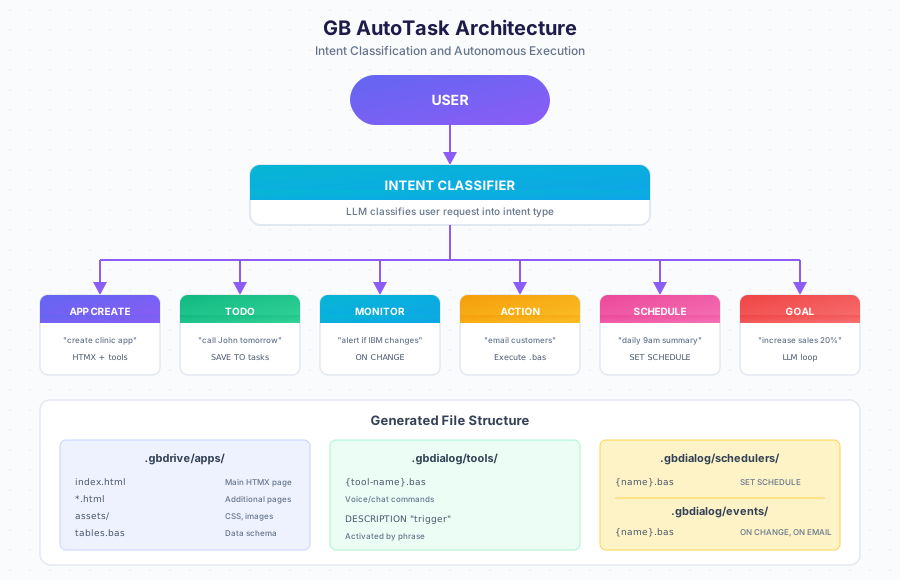
Intent Types
| Type | Example | What Gets Created |
|---|---|---|
APP_CREATE | “create app for clinic” | HTMX pages, tools, schedulers |
TODO | “call John tomorrow” | Task saved to tasks table |
MONITOR | “alert when IBM changes” | ON CHANGE event handler |
ACTION | “email all customers” | Executes immediately |
SCHEDULE | “daily 9am summary” | SET SCHEDULE automation |
GOAL | “increase sales 20%” | Autonomous LLM loop with metrics |
TOOL | “when I say X, do Y” | Voice/chat command |
Quick Start
Architecture Overview
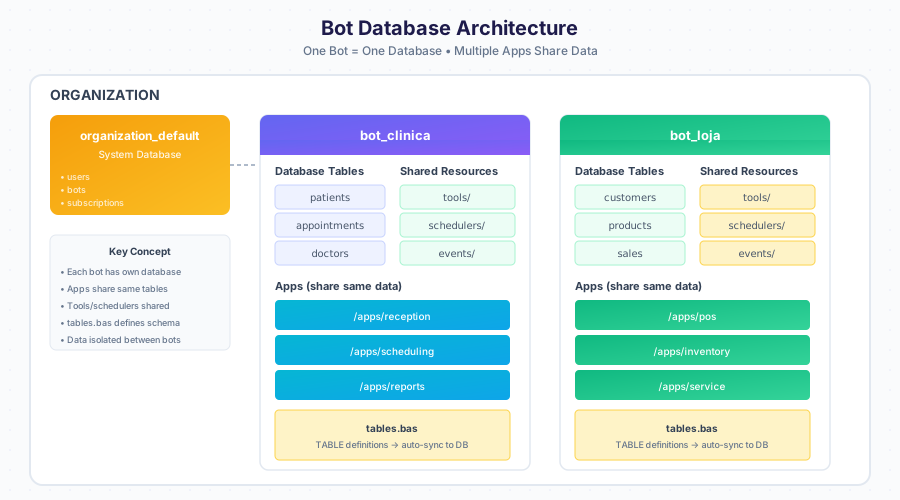
One bot equals one database. All applications within a bot share the same data tables, tools, and schedulers.
File Structure
| Path | Description |
|---|---|
.gbdrive/apps/{name}/ | Generated web application |
.gbdrive/apps/{name}/index.html | Main HTMX page |
.gbdrive/apps/{name}/assets/ | CSS, images |
.gbdialog/tables.bas | Database schema definitions |
.gbdialog/tools/ | Voice and chat commands |
.gbdialog/schedulers/ | Timed automations |
.gbdialog/events/ | Event triggers (ON CHANGE, ON EMAIL) |
Creating an Application
Modifying Your Application
Use Designer to change anything about your app through conversation.
Adding Automation
Keywords Reference
| Keyword | Purpose |
|---|---|
TABLE | Define data structure |
FIND | Search records |
SAVE | Create record |
UPDATE | Modify record |
DELETE | Remove record |
TALK | Send message |
HEAR | Wait for input |
SET SCHEDULE | Create automation |
ON CHANGE | Monitor for changes |
ON EMAIL | Trigger on email received |
LLM / Chat Exposure (end-to-end reachability)
AutoTask is reachable from every channel (web, WhatsApp, Telegram) through the
unified __api_call__ surface — the API command catalog. The LLM discovers the
endpoints with api.find and executes them with api.exec; no BASIC keyword or
per-bot prompt change is required.
Registered surface:
| Endpoint | Purpose |
|---|---|
POST /api/autotask/classify | Classify a plain-language intent into an automation plan |
POST /api/autotask/compile | Compile an automation plan into a BASIC script |
POST /api/autotask/decide | Decide immediate vs scheduled execution mode |
POST /api/autotask/execute | Execute a compiled automation plan |
POST /api/autotask/create-and-execute | One-call automation: classify, plan, generate, execute |
GET /api/autotask/tasks | List AutoTask runs and their status |
GET /api/autotask/stats | Runs, success rate, pending approvals |
POST /api/autotask/tasks/:task_id/approve | Approve a pending task |
POST /api/autotask/tasks/:task_id/cancel | Cancel a queued or running task |
Curated chat commands (visible through apps.find/api.find):
tasks.autotask.create— turn plain language into a running automation (admin)tasks.autotask.list— list runs and statustasks.autotask.approve/tasks.autotask.cancel(admin)tasks.autotask.stats
Security: mutating AutoTask endpoints are admin-only via the
rbac_api_permissions matrix (/api/autotask% for POST/PUT/DELETE). The
discovery filter (api.find) and the executor (api.exec) both enforce it, so
regular users can list tasks but cannot generate or execute automation scripts.
Read-only GET endpoints remain open.
Next Steps
- Designer Guide — Edit apps through conversation
- Data Model — Understanding tables
- Task Workflow — How tasks execute
- Examples — Real-world applications