How To: Add Documents to Knowledge Base 🟡 BETA
Tutorial 3 of the Knowledge Base Series
Teach your bot from files in 15 minutes
Objective
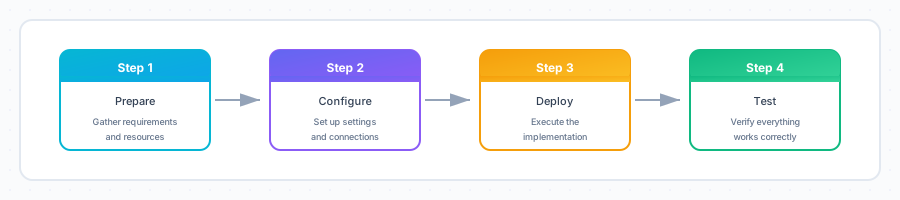
By the end of this tutorial, you will have:
- Prepared documents for the knowledge base
- Uploaded files to your bot’s
.gbkbfolder - Indexed documents for semantic search
- Tested that your bot can answer questions from the documents
Time Required
⏱️ 15 minutes
Prerequisites
Before you begin, make sure you have:
- A working bot (see Create Your First Bot)
- Access to the Drive app
- Documents to upload (PDF, Word, Text, or Markdown files)
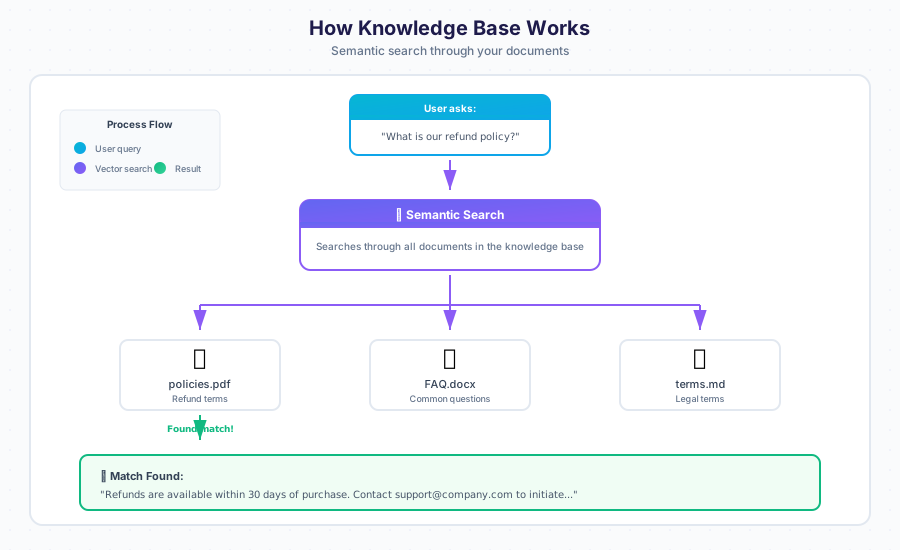
What is a Knowledge Base?
A Knowledge Base (KB) is a collection of documents that your bot uses to answer questions. When a user asks something, the bot searches through these documents to find relevant information.
Supported File Formats
| Format | Extension | Best For |
|---|---|---|
.pdf | Manuals, reports, official documents | |
| Word | .docx, .doc | Policies, procedures, articles |
| Excel | .xlsx, .xls | FAQs, structured data, tabular content |
| OpenDocument Spreadsheet | .ods | Open-source spreadsheet data |
| PowerPoint | .pptx, .ppt | Training materials, slide decks |
| OpenDocument Presentation | .odp | Open-source presentations |
| E-book | .epub | Books, long-form guides |
| OpenDocument Text | .odt | Open-source word processing |
| Text | .txt | Simple content, FAQs |
| Markdown | .md | Technical documentation |
| reStructuredText | .rst | Python/docs project documentation |
| AsciiDoc | .adoc | Technical publishing |
| HTML | .html | Web content |
| CSV / TSV | .csv, .tsv | Tabular data, exports |
| JSON / JSONL | .json, .jsonl | Structured data, API responses |
| YAML | .yaml, .yml | Configuration, structured content |
| TOML | .toml | Configuration files |
| Source Code | .py, .rs, .js, .ts, .sh, .sql, .graphql, .proto | Code documentation, technical references |
| CSS / SVG | .css, .svg | Style references, vector graphics text |
| Calendar / Contacts / Email | .ics, .vcf, .eml | Scheduling, address books, message archives |
| Config / Log | .ini, .conf, .cfg, .env, .properties, .log | System configuration, diagnostics |
Step 1: Prepare Your Documents
1.1 Gather Your Files
Collect the documents you want your bot to learn from. Good candidates include:
- ✅ Product manuals
- ✅ FAQ documents
- ✅ Company policies
- ✅ Help articles
- ✅ Training materials
1.2 Review Document Quality
Before uploading, check that your documents:
| Check | Why It Matters |
|---|---|
| Text is selectable | Scanned images can’t be indexed |
| Content is accurate | Bot will repeat incorrect info |
| Information is current | Outdated docs confuse users |
| No sensitive data | Protect confidential information |
⚠️ Warning: The bot will use exactly what’s in your documents. Remove any outdated or incorrect information first.
1.3 Organize Files (Optional)
For large knowledge bases, organize files into folders by topic:
mycompany.gbkb/
├── 📁 products/
│   ├── product-guide.pdf
│   └── specifications.docx
├── 📁 policies/
│   ├── refund-policy.pdf
│   └── privacy-policy.md
├── 📁 support/
│   ├── faq.docx
│   └── troubleshooting.pdf
└── 📁 training/
    └── onboarding-guide.pptx
✅ Checkpoint: You have documents ready to upload.
Step 2: Upload Files to Knowledge Base
2.1 Open the Drive App
Click the Apps Menu (⋮⋮⋮) and select Drive.
2.2 Navigate to Your Bot’s KB Folder
Navigate to your bot’s knowledge base folder:
📂 mycompany.gbai
   └── 📂 mycompany.gbkb    ◄── Open this folder
┌─────────────────────────────────────────────────────────────────────────┐
│  📁 Drive                                                               │
├─────────────────────────────────────────────────────────────────────────┤
│  📂 mycompany.gbai                                                      │
│     ├── 📂 mycompany.gbdialog                                          │
│     ├── 📂 mycompany.gbot                                               │
│     ├── 📂 mycompany.gbkb     ◄── Knowledge base folder                │
│     │      └── (your documents go here)                                │
│     └── 📂 mycompany.gbdrive                                            │
│                                                                         │
└─────────────────────────────────────────────────────────────────────────┘
2.3 Upload Your Documents
Method A: Drag and Drop
- Open your file explorer
- Select the documents you want to upload
- Drag them into the Drive window
Method B: Upload Button
- Click the Upload button (📤)
- Select files from your computer
- Click Open
┌─────────────────────────────────────────────────────────────────────────┐
│  📁 Drive > mycompany.gbai > mycompany.gbkb                            │
├─────────────────────────────────────────────────────────────────────────┤
│  ┌─────────────────┐  ┌─────────────────┐                              │
│  │ 📤 Upload       │  │ 📁 New Folder   │                              │
│  └─────────────────┘  └─────────────────┘                              │
├─────────────────────────────────────────────────────────────────────────┤
│                                                                         │
│  📄 company-faq.pdf                              2.3 MB   Just now     │
│  📄 product-manual.docx                          1.1 MB   Just now     │
│  📄 refund-policy.pdf                            0.5 MB   Just now     │
│                                                                         │
│  ━━━━━━━━━━━━━━━━━━━━━━━━━━━━━━━━━━━━━━━━━━━━━━━━━━━━━━━━━━━━━━━━━━━━ │
│  ↑ Drag files here to upload                                           │
│                                                                         │
└─────────────────────────────────────────────────────────────────────────┘
2.4 Wait for Upload to Complete
You’ll see a progress indicator for each file. Wait until all uploads finish.
💡 Tip: Large files may take longer. PDF files typically upload fastest.
✅ Checkpoint: Your documents appear in the .gbkb folder.
Step 3: Index the Knowledge Base
After uploading, you need to index the documents so the bot can search them.
3.1 Automatic Indexing
In most cases, indexing happens automatically when files are uploaded. Look for:
- A “Processing…” indicator
- Files changing from gray to normal color
- A completion notification
3.2 Manual Indexing (If Needed)
If automatic indexing doesn’t start, trigger it manually:
From Chat:
/reindex
From a BASIC Dialog:
' Clear and rebuild the knowledge base
CLEAR KB
USE KB "mycompany"
3.3 Check Indexing Status
You can check how many documents are indexed:
From Chat:
/kb stats
Expected Output:
┌─────────────────────────────────────────────────────────────────────────┐
│  📊 Knowledge Base Statistics                                          │
├─────────────────────────────────────────────────────────────────────────┤
│                                                                         │
│  Collection: mycompany                                                  │
│  Documents:  3                                                          │
│  Vectors:    847                                                        │
│  Status:     ● Ready                                                    │
│  Last Index: 2 minutes ago                                              │
│                                                                         │
└─────────────────────────────────────────────────────────────────────────┘
✅ Checkpoint: Documents are indexed and ready to search.
Step 4: Test the Knowledge Base
4.1 Open Chat
Click the Apps Menu (⋮⋮⋮) and select Chat.
4.2 Ask a Question from Your Documents
Type a question that can be answered by your uploaded documents:
You: What is the refund policy?
4.3 Verify the Response
The bot should answer using information from your documents:
┌─────────────────────────────────────────────────────────────────────────┐
│  💬 Chat                                                                │
├─────────────────────────────────────────────────────────────────────────┤
│                                                                         │
│      ┌─────────────────────────────────────────────────────────────┐   │
│      │  👤 You                                                     │   │
│      │  What is the refund policy?                                 │   │
│      └─────────────────────────────────────────────────────────────┘   │
│                                                                         │
│      ┌─────────────────────────────────────────────────────────────┐   │
│      │  🤖 Bot                                                     │   │
│      │                                                             │   │
│      │  Based on our refund policy document:                       │   │
│      │                                                             │   │
│      │  Customers may request a full refund within 30 days of      │   │
│      │  purchase. After 30 days, refunds are prorated based on     │   │
│      │  usage. To request a refund, contact support@company.com    │   │
│      │  with your order number.                                    │   │
│      │                                                             │   │
│      │  📄 Source: refund-policy.pdf                               │   │
│      └─────────────────────────────────────────────────────────────┘   │
│                                                                         │
└─────────────────────────────────────────────────────────────────────────┘
4.4 Test Different Questions
Try several questions to ensure the knowledge base is working:
| Test Question | Expected Source |
|---|---|
| “How do I return a product?” | refund-policy.pdf |
| “What are the product specs?” | product-manual.docx |
| “How do I contact support?” | company-faq.pdf |
✅ Checkpoint: Your bot answers questions using the uploaded documents!
🎉 Congratulations!
You’ve successfully added documents to your knowledge base! Here’s what you accomplished:
┌─────────────────────────────────────────────────────────────────────────┐
│                                                                         │
│    ✓ Prepared documents for upload                                      │
│    ✓ Uploaded files to the .gbkb folder                                │
│    ✓ Indexed documents for semantic search                              │
│    ✓ Tested that the bot can answer from documents                      │
│                                                                         │
│    Your bot can now answer questions from your documents!               │
│                                                                         │
└─────────────────────────────────────────────────────────────────────────┘
Troubleshooting
Problem: Bot doesn’t find information from documents
Cause: Documents may not be indexed yet.
Solution:
- Check indexing status with
/kb stats - Wait a few minutes for processing to complete
- Try
/reindexto force re-indexing
Problem: Bot gives wrong information
Cause: Document contains outdated or incorrect content.
Solution:
- Review the source document
- Update or replace the incorrect document
- Re-index the knowledge base
Problem: “No relevant information found”
Cause: Question doesn’t match document content well enough.
Solution:
- Try rephrasing the question
- Use keywords that appear in your documents
- Check that the document actually contains the answer
Problem: Upload fails
Cause: File too large or unsupported format.
Solution:
- Check file size (max 50MB per file)
- Verify file format is supported
- Try converting to PDF if format issues persist
Problem: PDF text not extracted
Cause: PDF contains scanned images, not selectable text.
Solution:
- Use OCR software to convert image-based PDFs
- Or recreate the document as a text-based PDF
- Consider using Word format instead
Best Practices
Document Organization
┌─────────────────────────────────────────────────────────────────────────┐
│                    RECOMMENDED KB STRUCTURE                             │
├─────────────────────────────────────────────────────────────────────────┤
│                                                                         │
│  mycompany.gbkb/                                                        │
│  │                                                                      │
│  ├── 📁 policies/          ◄── Company policies                        │
│  │   ├── refund-policy.pdf                                              │
│  │   ├── privacy-policy.pdf                                             │
│  │   └── terms-of-service.pdf                                           │
│  │                                                                      │
│  ├── 📁 products/          ◄── Product documentation                   │
│  │   ├── product-guide.pdf                                              │
│  │   ├── user-manual.pdf                                                │
│  │   └── specifications.xlsx                                            │
│  │                                                                      │
│  ├── 📁 support/           ◄── Support resources                       │
│  │   ├── faq.docx                                                       │
│  │   └── troubleshooting.pdf                                            │
│  │                                                                      │
│  └── 📁 internal/          ◄── Internal documentation                  │
│      ├── processes.docx                                                 │
│      └── guidelines.pdf                                                 │
│                                                                         │
└─────────────────────────────────────────────────────────────────────────┘
Content Guidelines
- Be specific — Clear, detailed content produces better answers
- Use headings — Helps the bot find relevant sections
- Include keywords — Use terms users are likely to search for
- Update regularly — Keep documents current
- Remove duplicates — Avoid conflicting information
Naming Conventions
| ✅ Good Names | ❌ Bad Names |
|---|---|
refund-policy-2024.pdf | doc1.pdf |
product-manual-v2.docx | final final (2).docx |
employee-handbook.pdf | new document.pdf |
Advanced: Using KB in Dialogs
You can reference the knowledge base in your BASIC dialogs:
' Activate a specific knowledge base
USE KB "mycompany"

' Ask the user what they want to know
TALK "What would you like to know about?"
HEAR question

' The bot will automatically search the KB and respond
Multiple Knowledge Bases
You can have different knowledge bases for different purposes:
' Switch between knowledge bases based on topic
TALK "Are you asking about Products or Policies?"
HEAR topic

IF topic = "Products" THEN
    USE KB "products"
ELSE IF topic = "Policies" THEN
    USE KB "policies"
END IF

TALK "What would you like to know?"
HEAR question
Next Steps
| Next Tutorial | What You’ll Learn |
|---|---|
| Import a Website | Crawl web pages into your KB |
| Create FAQ Responses | Define question-answer pairs |
| Manage Collections | Organize knowledge by topic |
Quick Reference
Chat Commands
| Command | Description |
|---|---|
/kb stats | Show knowledge base statistics |
/reindex | Rebuild the search index |
/kb list | List all KB collections |
BASIC Keywords
| Keyword | Description | Example |
|---|---|---|
USE KB | Activate a KB | USE KB "mycompany" |
CLEAR KB | Clear current KB | CLEAR KB |
KB STATISTICS | Get KB info | stats = KB STATISTICS |
File Size Limits
| File Type | Max Size |
|---|---|
| 100 MB | |
| Word / EPUB / ODT | 100 MB |
| Excel / ODS | 100 MB |
| PowerPoint / ODP | 100 MB |
| Text / MD / Code / Config | 100 MB |
| Any text-based format | 100 MB |
Tutorial 3 of 30 • Back to How-To Index • Next: Import a Website →