Suite 🟡 PREVIEW - Full Desktop Interface
Complete productivity suite with integrated applications
Not a launcher app. the suite shell itself, not an app running inside it. This page is kept here because it documents part of the suite, but it does not appear in the app menu and has no stability classification.
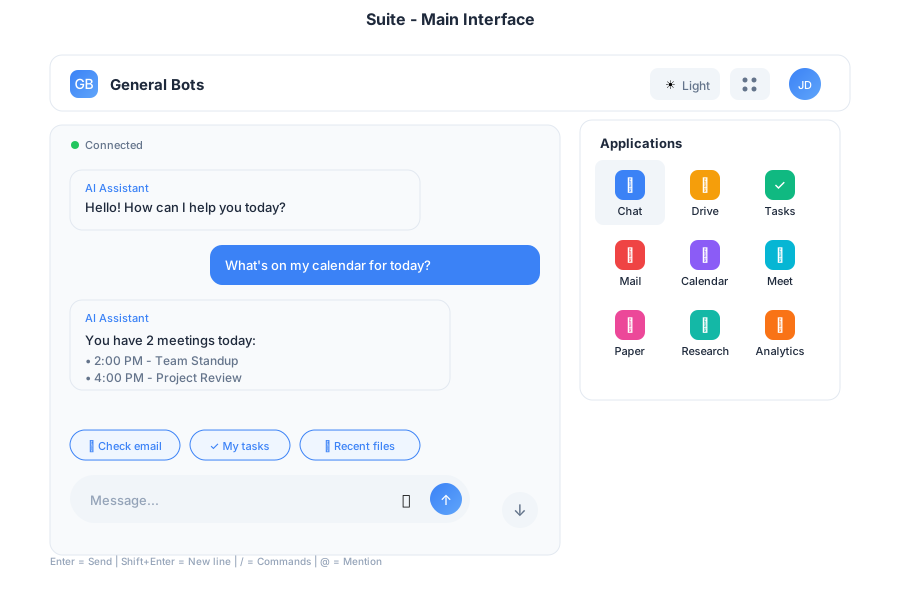
Overview
The Suite provides a complete desktop interface with multiple integrated applications for web, desktop, and mobile platforms. It serves as the primary interface for General Bots, combining AI-powered chat with productivity tools.
Features
Multi-Application Layout
The Suite includes integrated applications:
| App | Purpose |
|---|---|
| 💬 Chat | AI assistant conversations |
| 📁 Drive | File management |
| ⚡ Tasks | LLM-powered intelligent execution |
| Email client | |
| 📅 Calendar | Scheduling |
| 🎥 Meet | Video calls |
| 🎬 Player | Media viewer |
| 📝 Paper | AI writing |
| 🔍 Research | AI search |
| 📊 Analytics | Dashboards |
Responsive Design
The Suite adapts to any screen size:
- Desktop (>1024px): Full multi-panel layout with persistent navigation
- Tablet (768-1024px): Collapsible sidebar with touch-optimized controls
- Mobile (<768px): Single column with bottom navigation and swipe gestures
Theme Support
- Light and dark mode
- Custom color schemes via
.gbtheme - Automatic system preference detection
Navigation
Header Bar
The header provides quick access to:
- Logo and branding
- App selector grid
- Theme switcher
- User menu and settings
App Launcher
Click the grid icon (⋮⋮⋮) to access all applications in a dropdown menu.
Keyboard Shortcuts
| Shortcut | Action |
|---|---|
Alt+1 | Chat |
Alt+2 | Drive |
Alt+3 | Tasks |
Alt+4 | |
Alt+5 | Calendar |
Alt+6 | Meet |
Esc | Close menus |
Usage
As Desktop App
Use the botui Tauri application for native desktop experience:
# From the botui directory
cd botui
cargo tauri dev
# Opens Suite in native window
Or build the standalone app:
cd botui
cargo tauri build
# Creates distributable app in target/release
As Web Interface
Default template for browser access:
./botserver
# Browse to http://localhost:9000
# Loads Suite interface
As Mobile PWA
Install as Progressive Web App:
- Open in mobile browser
- Add to home screen
- Launches as standalone app
Example Workflows
Quick Task Creation
File Sharing
Meeting Scheduling
Performance
| Metric | Target |
|---|---|
| Initial Load | < 200KB |
| WebSocket Latency | < 50ms |
| Touch Response | 60fps animations |
| Offline Support | Service worker caching |
Browser Support
- Chrome/Edge 90+
- Firefox 88+
- Safari 14+
- Mobile browsers (iOS Safari, Chrome Mobile)
Configuration
Customize Suite behavior in config.csv:
key,value
theme-color1,#0d2b55
theme-color2,#e3f2fd
theme-title,My Company Suite
theme-logo,https://example.com/logo.svg
suite-default-app,chat
suite-sidebar-collapsed,false
See Also
- Chat App - AI assistant
- Drive App - File management
- Tasks App - Task management
- HTMX Architecture - Technical details