Desktop 🟡 PREVIEW - Virtual Desktop
Remote desktop via VNC
Not a launcher app. the desktop shell itself, not an app running inside it. This page is kept here because it documents part of the suite, but it does not appear in the app menu and has no stability classification.
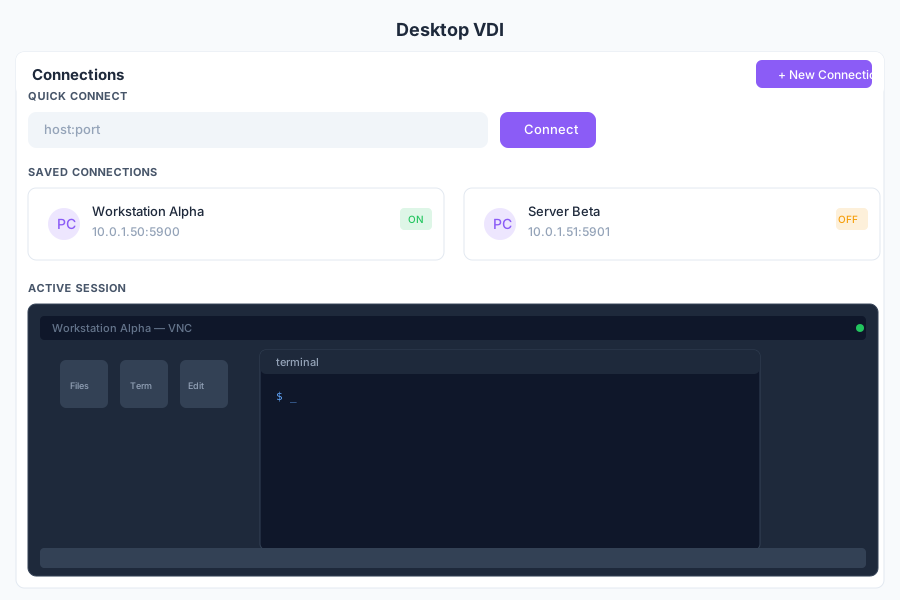
Overview
Desktop provides remote desktop access to virtual machines and servers directly from General Bots Suite. Connect via VNC, control the remote session with full keyboard and mouse support, and manage your saved connections for quick access.
Features
Connections
Manage your saved VNC connections:
- Quick Connect — Enter a host and port for a one-time connection
- Saved Connections — Store frequently used hosts with credentials
- Connection Groups — Organize connections by environment (dev, staging, prod)
- Auto-Reconnect — Automatically reconnect on network interruption
- Connection History — View recently connected hosts
VNC Session
Full remote desktop control:
- Keyboard Input — Send keystrokes including special keys
- Mouse Control — Full mouse movement, click, and scroll support
- Clipboard Sync — Copy and paste between local and remote
- Screenshot — Capture the current remote screen
- Disconnect — Gracefully end the session
Resolution
Configure the remote desktop resolution:
- Auto — Match the browser viewport size
- Custom — Set a specific resolution (e.g., 1920x1080)
- Fullscreen — Expand to fill the entire browser window
Scaling
Adjust the remote desktop display:
- Fit to Window — Scale the remote screen to fit the browser
- Original Size — Display at native resolution (scrollable)
- Custom Zoom — Manually adjust the zoom level
Ctrl+Alt+Del
Send special key combinations to the remote session:
- Ctrl+Alt+Del — Trigger the system menu on Windows hosts
- Ctrl+Alt+Esc — Alternative system menu
- Ctrl+Alt+Backspace — Reset X server on Linux hosts
- Custom Combo — Send any key combination via dropdown
Keyboard Shortcuts
| Shortcut | Action |
|---|---|
F11 | Toggle fullscreen mode |
Ctrl+Alt+D | Send Ctrl+Alt+Del to remote |
Ctrl+Alt+F | Toggle fit-to-window scaling |
Ctrl+Shift+C | Copy to clipboard |
Ctrl+Shift+V | Paste from clipboard |
Escape | Release mouse capture |
N | New connection |
/ | Search connections |
Desktop via Chat
API Reference
| Endpoint | Method | Description |
|---|---|---|
/api/desktop/connections | GET | List saved connections |
/api/desktop/connections | POST | Save a new connection |
/api/desktop/connections/:id | GET | Get connection details |
/api/desktop/connections/:id | PUT | Update connection |
/api/desktop/connections/:id | DELETE | Delete connection |
/api/desktop/connect | POST | Start a new VNC session |
/api/desktop/connect/:id | POST | Connect to a saved connection |
/api/desktop/sessions | GET | List active VNC sessions |
/api/desktop/sessions/:id | DELETE | Disconnect an active session |
/api/desktop/sessions/:id/screenshot | GET | Capture current screen |