Vibe — AI Development Environment 🟢 GA
Chat-driven coding, deployment, and infrastructure management
Stable. Vibe is one of the three supported surfaces in the suite, alongside Chat and Explorer. The Vibe specialist apps (Knowledge Graph, Metrics, Deploy, Database, Compute Metering, Project Members) are preview.
[!NOTE] Planned Features & Future Scope [SOON]
- Hermes Agent Harness [SOON]: An advanced cognitive loop system following formal harness engineering patterns for autonomous multi-step software construction.
- Advanced Vibe Knowledge Graphs [SOON]: Formal deep semantic mapping of project use cases and code logic databases using advanced graph engines.
Overview
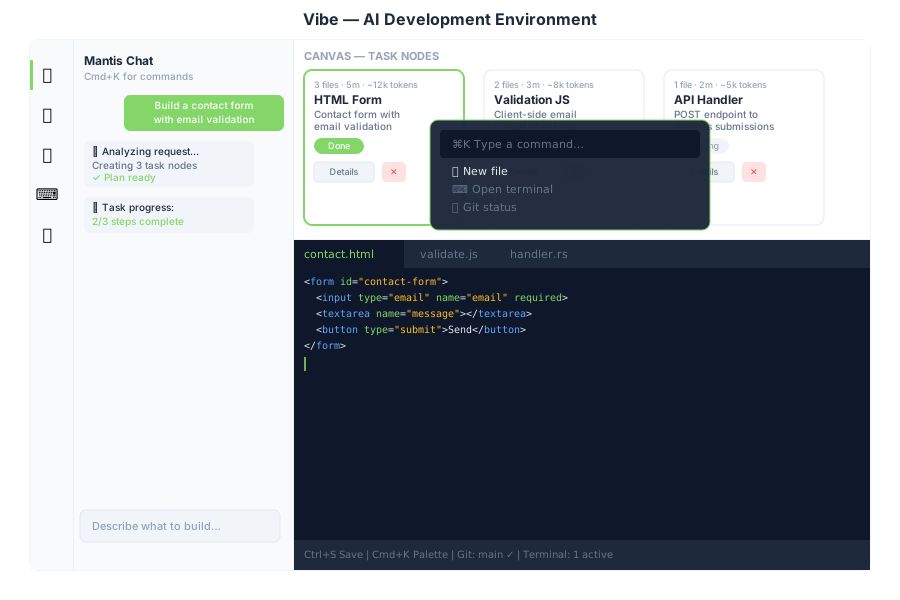
Vibe is the integrated development environment inside General Bots Suite. Describe what you want to build in plain language and Mantis AI agents generate task nodes, write code, run commands, and deploy — all from a single interface.
Features
Chat-Driven Development
Type a request in the chat panel. Mantis #1 classifies the intent via POST /api/autotask/classify, generates a plan, and creates task nodes on the canvas.
Canvas (Task Nodes)
Each task is represented as a node on the horizontal canvas showing:
- File count, estimated time, token usage
- Status (Planning → In Progress → Done)
- Sub-tasks (expandable file list)
- Details button — fetches full task info from
GET /api/autotask/tasks/:id - Delete button — removes node from canvas
Canvas state is persisted in localStorage (vibe-canvas-nodes) and restored on page load.
Ribbon Toolbar
Commands are grouped by pipeline stage so each tab shows only the actions that apply to that phase:
| Stage | Commands |
|---|---|
| PLAN | New Project · Designer · Knowledge Graph · Database |
| BUILD | Code Editor · Terminal · Browser · Source Control · Database |
| REVIEW | Approve & Resume · Deny & Cancel · Knowledge Graph · Review Changes |
| DEPLOY | Deploy · Push · Members |
| MONITOR | Metrics · Deployments · Logs |
Every command maps to a real handler (dialogs, run approve/deny, project create,
members typeahead, knowledge-graph panel, designer deep-link). review commands
only take effect while a run is actually waiting at an approval gate.
Command Palette
Press Cmd+K (or Ctrl+K) to open the command palette:
| Command | Action |
|---|---|
| New file | Opens editor panel |
| Open terminal | Opens terminal panel |
| Git status | Opens git panel |
| Database schema | Opens database panel |
| Clear canvas | Removes all task nodes |
| Deploy | Triggers deployment |
Press Escape to close.
Monaco Editor
Full code editor with:
- File tree sidebar →
GET /api/editor/files - Click to open files →
GET /api/editor/file/*path Ctrl+Sto save →POST /api/editor/file/*path- Syntax highlighting for Rust, JS, HTML, CSS, TOML
Terminal
Embedded xterm.js terminal connected via WebSocket → /api/terminal/ws.
Create, list, and kill terminal sessions via POST /api/terminal/create, GET /api/terminal/list, POST /api/terminal/kill.
Database Tool
- ER diagram of all tables
- Table viewer with pagination →
GET /api/database/table/:name/data - SQL query builder →
POST /api/database/query - Row insert/update/delete →
POST /api/database/table/:name/row
Git Integration
- Status and diff viewer →
GET /api/git/status,GET /api/git/diff/:file - Commit →
POST /api/git/commit - Push →
POST /api/git/push - Branch management →
GET /api/git/branches,POST /api/git/branch/:name - Log →
GET /api/git/log
VM Hosting (incus)
Projects can be hosted on a real container: the vm/instances API creates an
incus container per project (tier → CPU/RAM: small 1cpu/1GiB, medium 2/2,
large 4/4) with VIBE_PROJECT=1 set. Workspace files are copied in and the
app runs on port 80 — GET /api/vm/instances reports real incus state
(running/stopped) read from incus list --format json. The dev user must
be in the incus-admin group to talk to the incus socket.
Deployment
Click Deploy to package the project workspace and push it to the
self-hosted Forgejo (ALM) instance. The publish path (/api/deployment/deploy)
now sends the actual workspace files (skipping .git, node_modules, target,
etc.) so ForgejoClient::push_app commits real source — not an empty app —
before the CI/CD workflow runs.
Forgejo runs locally like the other stack components: localhost:4747, with
credentials self-provisioned into Vault secret/gbo/alm (url/username/password/
API token/runner token) during botserver bootstrap. Consumers resolve
FORGEJO_URL → ALM_URL → http://localhost:4747 (no hardcoded remote URL).
Real-time progress streams via the task progress WebSocket, shown in the chat panel.
Project Templates
Starter content for a new project is owned by the codebase itself
(botvibe/src/templates.rs): a calculator project is seeded with a working
arithmetic service (calc.js, index.js, test.js, package.json) and any
other project gets a minimal README starter. Seeding never clobbers existing
work — a non-empty workspace is left untouched.
Because the templates are compiled in, no sample project tree ships at the
repository root; the former sample-node-app/ fixture was removed (#1326). To
try a hosted Node application, create a project in Vibe and publish it through
the publish path above.
Vibe Agent Gateway (project registry + tool harness)
Vibe is backed by the botvibe crate, exposed through botserver under the vibe feature.
Project Registry (DB-backed)
Projects live in the vibe_projects table (migration 6.5.49-vibe-projects), replacing hardcoded workspace modeling. Scoped by org_id/branch_id like other SaaS tables (nil UUID = global default-bot scope):
| Method | Endpoint | Description |
|---|---|---|
POST | /api/vibe/projects | Create project (name, kind: bot/website/custom, repo, framework, env) |
GET | /api/vibe/projects | List projects (filter by branch_id, project_type, status; paginate) |
GET | /api/vibe/projects/:project_id | Get one project |
PUT | /api/vibe/projects/:project_id | Update name/type/repo/framework/env/status/payload |
DELETE | /api/vibe/projects/:project_id | Delete a project |
Payload is a free-form JSONB pragma used by agents (deploy hints, hooks, manifest).
Run API (agent runs)
| Method | Endpoint | Description |
|---|---|---|
POST | /api/vibe/run | Create a run: {"intent": "...", "use_case": "...", "auto_approve": bool} |
GET | /api/vibe/run/:run_id | Run state + executed tool calls |
POST | /api/vibe/run/:run_id/cancel | Cancel a run |
POST | /api/vibe/run/:run_id/approve | Approve pending tool calls |
GET | /api/vibe/runs | List runs (filters: state, use_case, limit, offset) |
GET | /api/vibe/tools · /api/vibe/tools/:use_case | Tool discovery |
GET | /api/vibe/events/:run_id | Progress event stream (telemetry) |
GET | /api/vibe/metrics / /api/vibe/metrics/:run_id | Run metrics |
Real Tool Harness
The tool registry no longer returns stubs — the harness (botvibe/src/harness/) implements sandboxed tools operating on a per-project workspace under VIBE_WORKSPACE_ROOT (default /opt/gbo/data/vibe-workspaces/{project}).
LLM configuration resolves per-bot with the bot’s real branch preferred
(fixing a bug where a stale nil-branch bot_configuration row shadowed the
active config and caused every run to fail with 401). Streamed tool-call
arguments that arrive truncated (invalid JSON) are detected and the turn is
retried non-streaming, so file/write never silently emits an empty/corrupt
file. Runs remain queryable during execution (state=running) and project
creation is idempotent (re-POSTing the same name returns the existing project).
| Tool | Description | Approval |
|---|---|---|
file/read file/write file/list file/delete file/exists | Workspace-confined file operations (path traversal guarded) | write/delete require approval |
shell/run | Run allowlisted commands (git, cat, ls, npm, cargo, python3, …) with arg validation, env wipe, timeout | requires approval |
git/status git/log git/diff git/commit git/init | Local git operations in the project workspace | commit/init require approval |
logs/read logs/list | Runtime log tailing | read-only |
test/run test/list | Test suite execution + framework detection | run requires approval |
Any not-yet-wired plugin tool returns an honest error instead of fake success JSON.
VIBE bridge keywords (chat)
The BASIC surface can drive the agent through the local Vibe API:
| Keyword | Purpose |
|---|---|
VIBE RUN "{intent}" | Create an agent run (returns run_id + state) |
VIBE STATUS "{run_id}" | Poll run state + executed tool count |
VIBE APPROVE "{run_id}" | Approve pending tool calls |
VIBE CANCEL "{run_id}" | Cancel a run |
VIBE TOOLS | List available tools |
VIBE EVENTS "{run_id}" | Stream latest progress events |
Example start.bas:
' start.bas — Vibe demo
ADD_SUGGESTION "VIBE RUN \"Criar website institucional\""
ADD_SUGGESTION "VIBE TOOLS"
SET CONTEXT "vibe" = "You are the General Bots assistant. Use VIBE RUN to create projects."
TALK "Olá! Posso criar projetos com o agente Vibe."
The demo bot and its config.csv are not seeded automatically: create the bot
in Drive and add these lines to its start.bas.
Quality Gate (CI)
Every merge to Vibe’s agent loop is gated by the boteval benchmark suite
(vibe-200.json — 210 deterministic contract checks, including 14 live
harness entries). CI runs boteval-run --gate botserver/crates/boteval/ci/gate.toml:
exit code 0 allows the merge, 1 blocks it.
There is exactly one gate configuration:
botserver/crates/boteval/ci/gate.toml. Both consumers read that copy —
the GitHub workflow (boteval.yml) and the compiled-in default in
botserver/crates/boteval/src/ci_gate.rs. The root
botserver/crates/boteval/gate.toml is only a pointer stub; editing it has
no effect.
| Setting | Value | Meaning |
|---|---|---|
min_pass_rate | 0.95 | Overall contract-check pass-rate floor |
max_failures | 0 | Any failed entry blocks the merge |
required_tags | software_development, customer_support, financial_analysis, general, harness | Tags that must be present and evaluated |
tag_pass_rates | 0.90 per required tag | Per-tag floors |
max_cost_per_task | 0.05 USD | Average LLM cost cap (0 disables) |
harness_min_tool_calls | 2 | Minimum tool calls per harness entry |
A unit test (gate_toml_is_valid_and_complete) parses the shipped config on
every build so an invalid TOML edit can never silently disable the gate, and
a guard test (only_one_gate_config_exists) keeps the root file a
comment-only stub.
Enabling Vibe
Vibe is always available in the suite — no feature gate required. Access it from the desktop icon or via http://localhost:3000/suite/vibe.