Feature System 🟡 BETA
This page tells a builder which Cargo features exist and where to check their dependencies before choosing a build.

Feature Dependency Tree
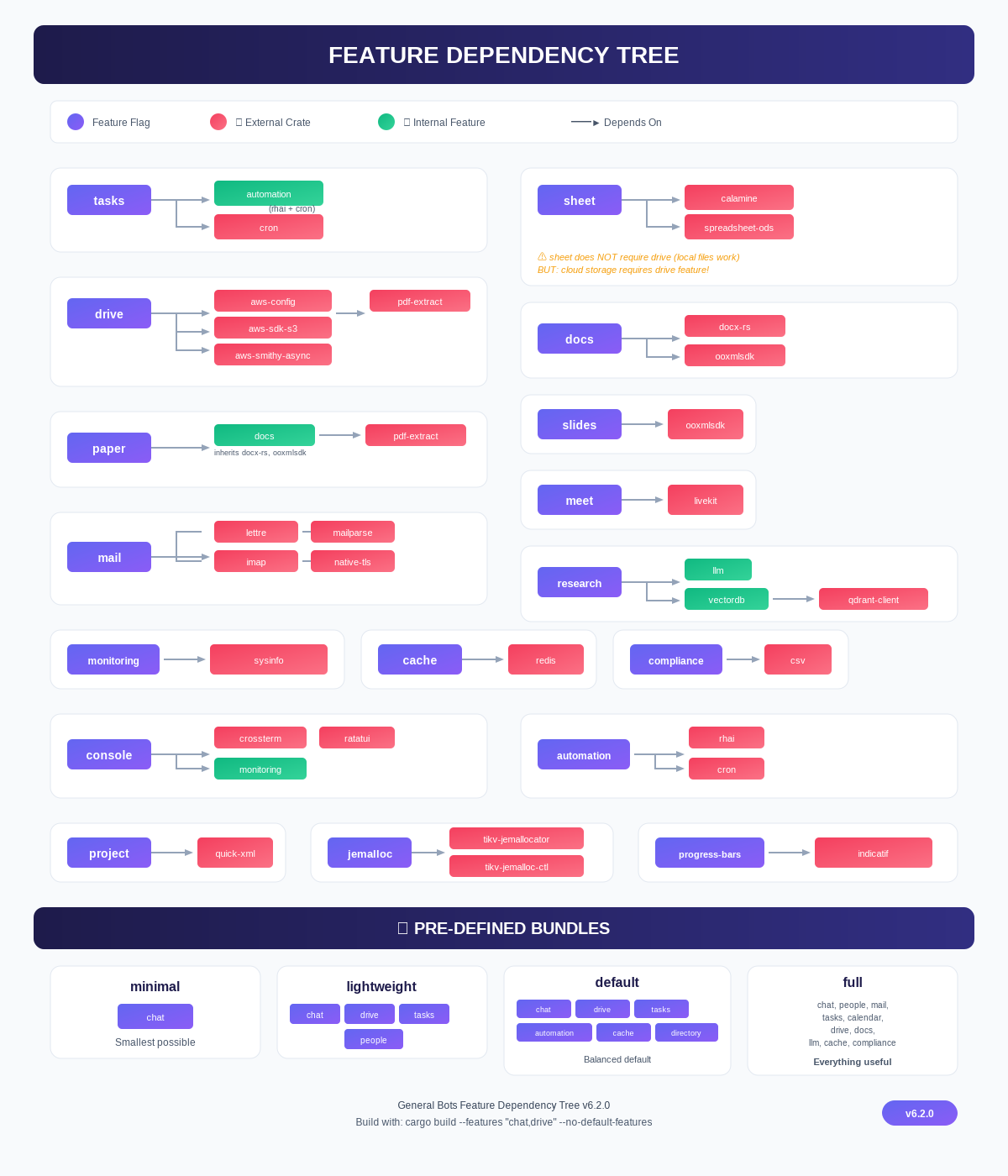
The manifest is the authority. The generated version matrix lists pinned component versions; this page names none.
Quick Start
Building with Specific Features
cargo build -p botserver --no-default-features --features chat
cargo build -p botserver --no-default-features --features chat,drive
cargo build -p botserver --no-default-features --features chat-drive
cargo build -p botserver --no-default-features --features gblite
Check the [features] block of botserver/Cargo.toml before you copy a command; a feature that is not declared there does not exist.
Feature Categories
🗣️ Communication Apps
| Feature | Purpose |
|---|---|
chat |
Chat app and its automation and cache dependencies |
mail |
Mail app and IMAP indexing |
meet |
Meeting app |
social |
Social app and channels |
whatsapp, telegram, instagram, msteams |
Channel adapters |
people |
People app |
📋 Productivity Apps
| Feature | Purpose |
|---|---|
calendar |
Calendar app |
tasks |
Tasks and cron |
project |
Project app |
plan |
Planning app |
goals |
Goals app |
workspaces |
Workspaces |
tickets |
Tickets |
billing |
Billing |
📄 Document Apps
| Feature | Purpose |
|---|---|
docs |
Document editor (OOXML dependencies) |
sheet |
Spreadsheet editor |
slides |
Presentation editor |
paper |
Paper app |
kb-extraction |
Lightweight document extraction |
drive |
Object storage |
🎥 Media Apps
| Feature | Purpose |
|---|---|
video |
Video app |
player |
Media player |
canvas |
Drawing surface |
🧠 Learning & Research
| Feature | Purpose |
|---|---|
learn |
Learning app |
research |
Research with LLM and vector store |
sources |
Data sources |
web-search |
Web lookup inside a chat turn |
📊 Analytics
| Feature | Purpose |
|---|---|
analytics |
Analytics app |
dashboards |
Dashboard app |
monitoring |
System monitoring |
🔧 Development Tools
| Feature | Purpose |
|---|---|
designer |
UI designer |
editor |
File editor |
database |
Database tool |
git |
Git tool |
console |
Terminal UI |
⚙️ Core Technologies
| Feature | Purpose |
|---|---|
llm |
LLM providers |
vectordb |
Qdrant client |
cache |
Cache client |
automation |
Cron and scripting |
scripting |
Rhai engine |
security, directory, rbac |
Security, identity and roles |
consent |
Permission cards |
integrations |
Provider connections |
Pre-Defined Bundles
minimal
["chat"] — the smallest declared bundle.
lightweight
["chat", "tasks", "people"] — three apps without the full catalog.
default
["all-apps", "botcore/default"] — a normal build compiles every application. The .product file decides launcher visibility, not Cargo.
full
["chat", "people", "mail", "tasks", "calendar", "drive", "docs", "llm", "cache", "compliance", "tax"].
Common Scenarios
📱 Chat + Drive (Minimum Cloud)
cargo build -p botserver --no-default-features --features chat,drive
📊 Sheets + Drive
cargo build -p botserver --no-default-features --features sheet,drive
The sheet feature already enables drive; add it only when you want the storage app as well.
🤖 Chat + Local LLM
cargo build -p botserver --no-default-features --features chat,llm
🏢 Office Suite
cargo build -p botserver --no-default-features --features docs,sheet,slides,drive
📧 Email-Focused
cargo build -p botserver --no-default-features --features chat,mail,cache
Feature Validation
| Feature | Enables through the manifest |
|---|---|
tasks |
automation, drive, cache |
docs |
kb-extraction, drive, cache |
research |
llm, vectordb |
console |
monitoring |
chat-drive |
all-apps-adjacent app set plus core infrastructure |
gblite |
chat, drive, llm, security, directory, consent and agent VM |
Read [features] for the exact list; a comment is not a dependency.
Size Comparison
Artifact names and checksums are published with each release. This page gives no size estimates. Use the version matrix for pinned component versions and the release page for artifacts.
v1 Suite App Completeness (2026-08)
App Unifications
Cargo still declares itsm and erp features. Launcher visibility comes from the app registry and the .product file; read the generated registry before assuming an app is gone.
New Backend Endpoints
Routes change with every build. Use the generated REST reference and the API examples instead of a hand-written endpoint list.
Cloud Store — 3D Printing Section
The cloud store ships botui/ui/cloud/print3d.html with a sidebar link. The page itself is the authority for its current sections.
o365 — Unified Office App
The botm365 crate backs the o365 app; the /api/o365/* namespace aliases /api/m365/*. See the generated app pages for its launcher state.
Sample Data
The sampledata feature enables botsampledata. It is opt-in: add it to a build only when you want demo records.