Multi-Agent Orchestration 🟡 BETA
This chapter documents the task and app-generation path: an intent is classified and compiled into a plan, executed through botautotask, and edited through botdesigner.
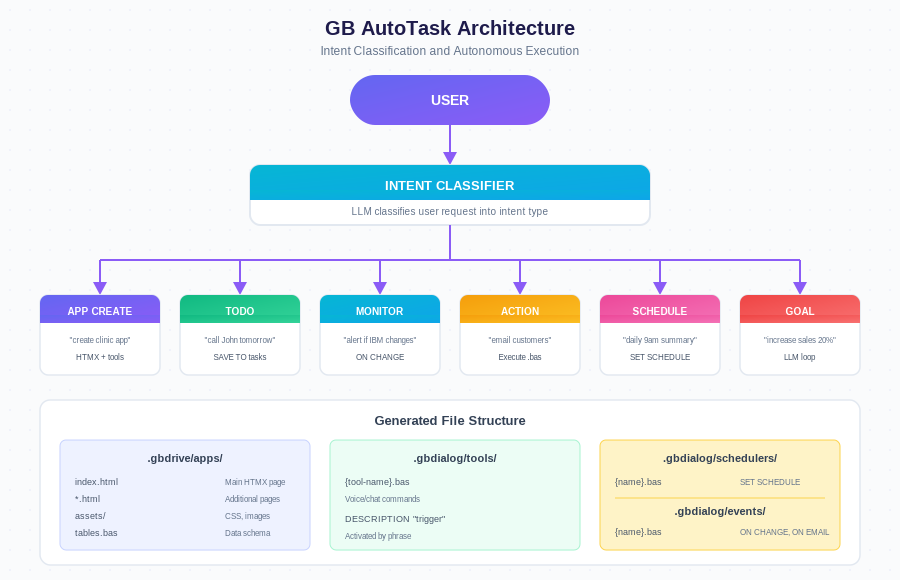

Intent Types
Intent classification and compilation are handlers in botautotask, exposed at /api/autotask/classify and /api/autotask/compile. The plan that results is executed by the same crate.
| Stage | Route |
|---|---|
| Classify | POST /api/autotask/classify |
| Compile | POST /api/autotask/compile |
| Execute | POST /api/autotask/execute |
| Create and execute | POST /api/autotask/create-and-execute |
Quick Start
- Describe the desired app or task in the Designer or Automations surface.
- The intent is classified and compiled into a plan.
- Execution creates tables and sources as configured by the plan.
- Approvals and decisions are handled through the task routes.
Architecture Overview
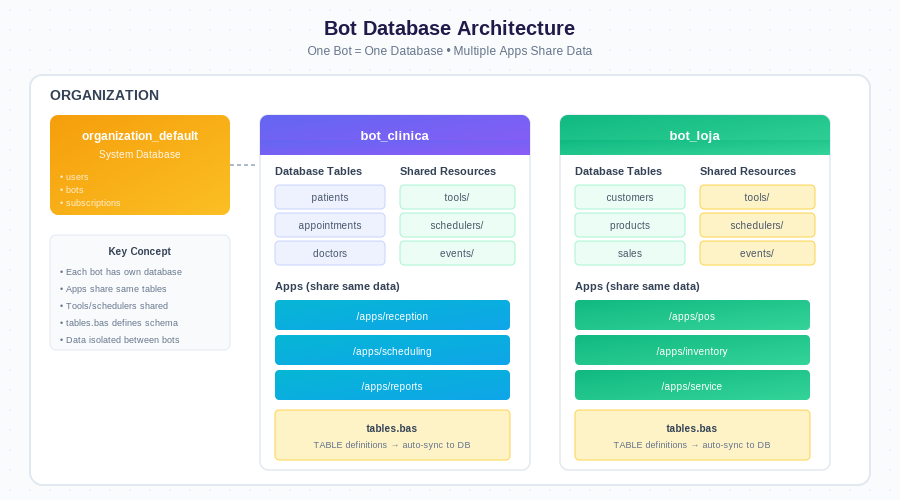
botautotask owns task types, manifests, execution, safety layer, sources and app logs. botdesigner owns file, dialog and canvas APIs. botagent owns per-user Incus workspaces and sandboxed execution.
File Structure
Generated app sources live in the bot's Drive tree under .gbdrive/apps/{appname}/; compiled .ast caches are artifacts. See App Generation and Data Model.
Creating an Application
Use the Designer flow or the task API; both converge on the same persisted manifest and sources.
Modifying Your Application
The Designer routes (/api/designer/*) load, save, validate, export and modify files, and the canvas routes add or update elements. See Designer.
Adding Automation
Schedules and event handlers are BASIC work; botautotask plans are a separate, AI-generated path. See Task Workflow.
Keywords Reference
BASIC remains the execution substrate: SET SCHEDULE, TABLE, FIND, USE TOOL and the memory keywords are registered in the BASIC crates. See the BASIC Reference.
LLM / Chat Exposure (end-to-end reachability)
Chat reaches this surface through registered BASIC keywords, tool scripts and app commands, not through raw REST calls. The generated REST reference documents the HTTP surface for clients.
Limits
- A catalog entry without an adapter cannot execute; a plan without a compiled source cannot be saved.
- App sources in Drive are generated artifacts; the bot's repository is the source for git-owned scripts.
- No endpoint outside the registered route list is documented here.
Related
- Introduction - Start of the book.
Next Steps
- Designer Guide - Edit apps through conversation
- Data Model - Understanding tables
- Task Workflow - How tasks execute
- Examples - Real-world applications