App Generation 🟡 BETA
App generation compiles an intent into a task manifest, persists sources under the bot's Drive tree and exposes the result through the Designer and task APIs.
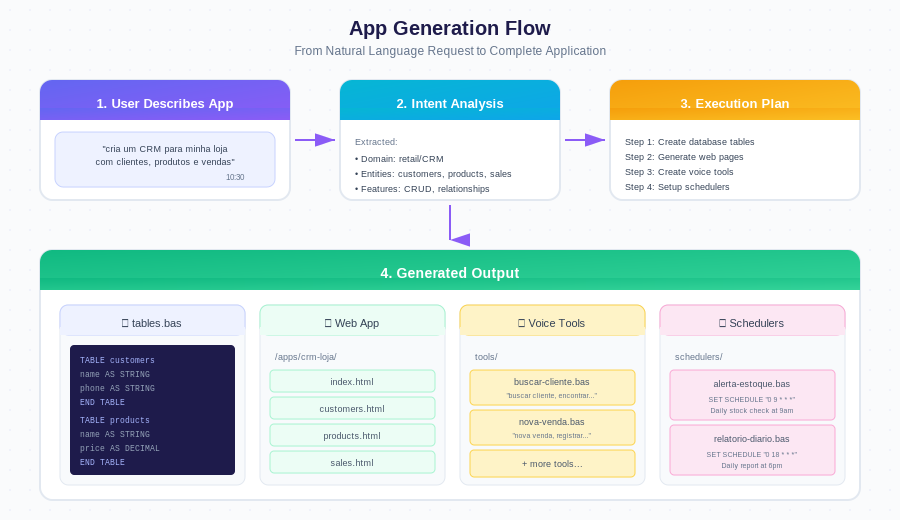

How It Works
| Stage | Code |
|---|---|
| Intent classified | botautotask::intent_classifier |
| Plan compiled | botautotask::intent_compiler and task_manifest |
| Tables attached | source_edit::attach_tables |
| Sources persisted | source_persist |
| Logs recorded | app_logs / /api/app-logs* |
What Gets Created
A generated app consists of sources under .gbdrive/apps/{appname}/, optional tables and compiled artifacts. Sources are written through the task handlers; .ast files are build artifacts.
Modifying Your App
Use the Designer routes to load, save, validate and export files, or POST /api/designer/modify for an LLM-driven modification. See Designer.
Multiple Apps, Shared Data
Apps in one bot share the bot's table scope. A table is attached to a task manifest through the sources routes, not by copying data between apps.
Generation Process
- Describe the app in the Designer or Automations surface.
- Classify and compile the intent.
- Review the plan and any approval request.
- Execute and inspect the generated sources and app logs.
Limits
- No app is created until a plan is executed and sources are persisted.
- Generated sources are not the source of truth for git-owned
.gbdialogscripts. - No UI is generated outside the apps the product profile exposes.
Related
- Chapter overview - Index of this chapter.
Next Steps
- Designer Guide - All modification commands
- Data Model - Understanding table definitions
- Task Workflow - Execution lifecycle