Desktop 🟡 PREVIEW - Virtual Desktop
Virtual desktop. This page describes the VDI window, not the desktop shell that hosts it.
What it is
Desktop is a virtual-desktop client: it stores connections and opens a remote session in the suite window.

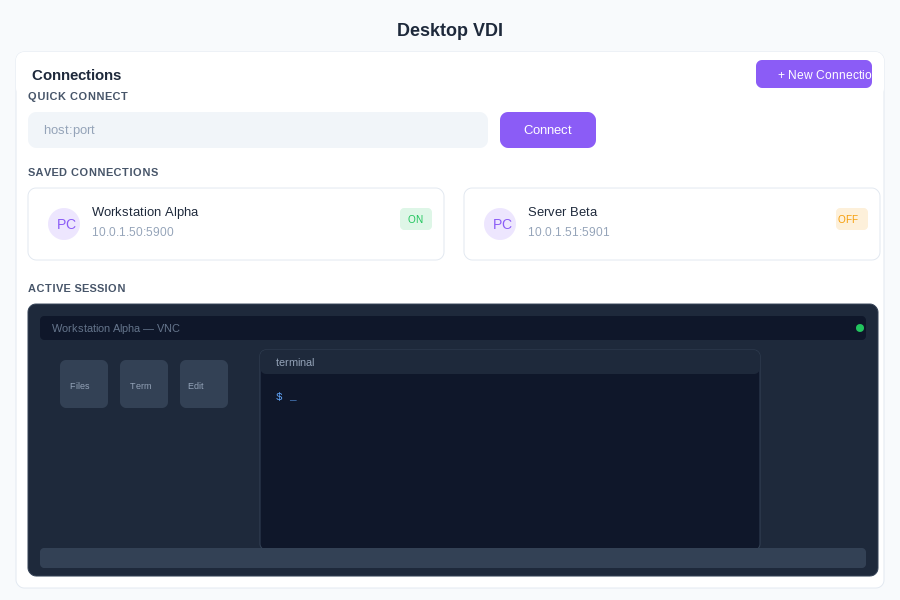
Open it
| Task | Where | Label you will see |
|---|---|---|
| Open the app | Desktop launcher, after Preview mode is on | Virtual Desktop |
| Add a destination | Empty state | No connections yet, + New Connection |
- Turn on Preview mode in the sidebar.
- Click Start, then Desktop.
- Choose + New Connection and save the destination.
Do this
| Task | Control | Label you will see |
|---|---|---|
| Describe the connection | New-connection form | Connection Name, Hostname or IP, Port, Protocol |
| Authenticate | Same form | Authentication, None, Password, VNC Authentication |
| Save and open | Form action | Save & Connect, Connect, Connecting... |
| Fit the view | Session toolbar | Fullscreen, Fit to Window, Actual Size, Stretch |
| Leave the session | Session toolbar | Disconnect, Disconnected |
| Send Ctrl+Alt+Del | Session toolbar | CAD |
Limits
- The connection fields are those in the form; the page names no default protocol.
- A session must be connected before the view controls apply; otherwise the list reads Disconnected.