Task Workflow 🟡 BETA
A task in botautotask moves through classification, compilation, execution and approval using a fixed set of registered routes.
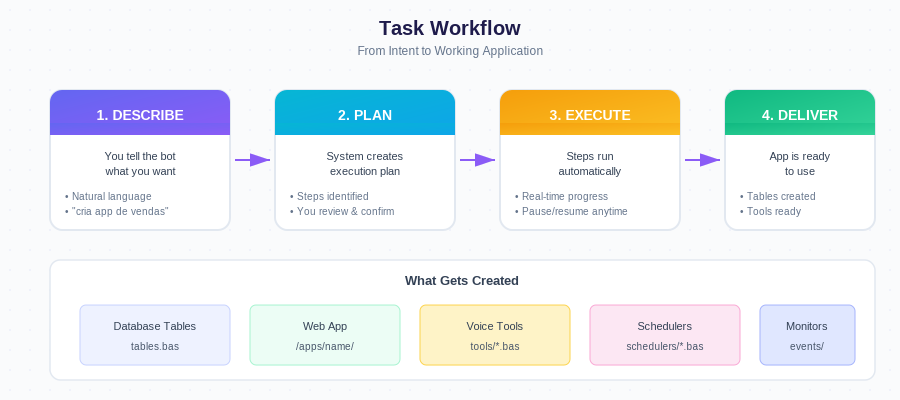

The Three Steps
| Step | Route | Owner |
|---|---|---|
| Classify intent | POST /api/autotask/classify |
intent_classifier |
| Compile plan | POST /api/autotask/compile |
intent_compiler |
| Execute plan | POST /api/autotask/execute |
execution |
POST /api/autotask/create-and-execute combines compilation and execution in one call.
Example Workflow
- Submit an intent to the classify route.
- Compile the selected intent into a task manifest.
- Execute the plan; sources and tables are persisted by the task handlers.
- Track runs with
GET /api/autotask/tasksandGET /api/autotask/stats.
Error Handling
Task output is written to app logs through /api/app-logs*; the client log route accepts browser-side records. Failed execution is visible in task state, not in a separate undocumented store.
Approval Requests
Decisions and approvals are submitted through POST /api/autotask/decide and POST /api/autotask/tasks/:task_id/approve; a task can be cancelled with POST /api/autotask/tasks/:task_id/cancel.
Actions Requiring Approval
An action is approval-gated when the safety layer marks it as such. The approval is a task-state transition, not a prompt-only instruction.
Limits
- Only the routes registered in
botautotask/src/api.rsare available. - A task cannot execute an action with no compiled source or tool.
- Consent and approval are separate mechanisms; one does not imply the other.
Related
- Chapter overview - Index of this chapter.
Next Steps
- Designer Guide - Edit apps through conversation
- Examples - Real-world applications
- API Reference - Route list