Designer 🟡 BETA
The Designer edits bot files and app sources through file, dialog and canvas routes, with an LLM-backed modify endpoint for conversational changes.
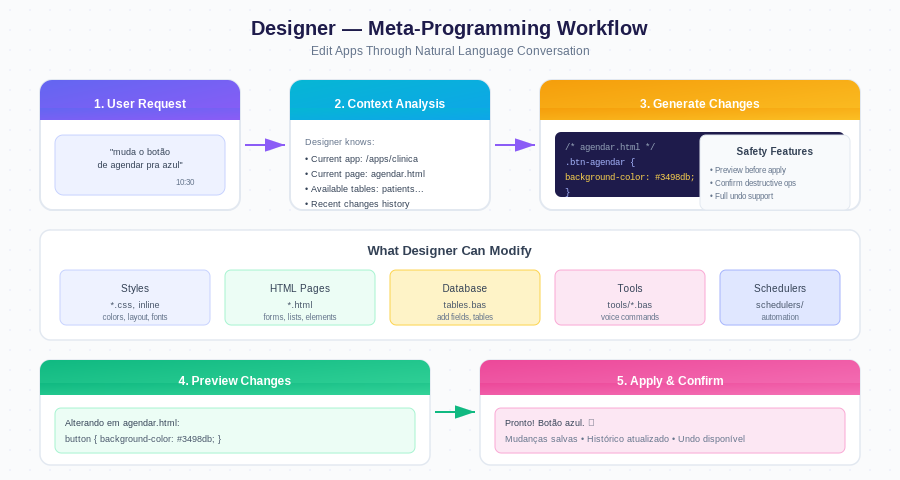

How It Works
| Route group | Routes | Purpose |
|---|---|---|
| Files | list, load, save, validate, export | Read and write bot files |
| Dialogs | list, create, get | Manage .gbdialog scripts |
| Modify | POST /api/designer/modify |
LLM-driven change |
| Canvas | create, elements, layers, group, export | Visual editing |
botdesigner receives its dependencies (pool, default-bot resolver, Drive load/write, LLM call and config reader) through DesignerState, so it does not own those services.
What Designer Can Modify
| Target | Route |
|---|---|
| Bot file contents | load / save / validate |
| Dialog scripts | dialog list / create / get |
| Canvas elements and layers | canvas API |
| Table declarations | through the generated app sources |
Editing Styles
Style edits are file edits: the Designer loads the relevant file, applies the requested change and validates it before saving. There is no separate style database.
Adding Form Fields and Voice Commands
Both are script or source edits. A form field becomes part of the app source; a voice command becomes a handler script in the bot's dialog set.
Creating Schedulers
A scheduler is a SET SCHEDULE statement in a BASIC script. The Designer changes the script; the automation feature executes it.
Context Awareness
GetDesignerErrorContextFn supplies error context to the LLM path so a failed edit can be retried with the compiler's message.
Handling Sensitive Information
Credentials are not part of Designer files. Connections store their secrets in Vault, and LLM-safe action metadata excludes authentication fields.
Chat Reachability and Current Parity
Designer operations are reachable in chat through registered app commands, not by calling the HTTP routes from a model. Check the app command catalog and the app registry for the current surface.
Limits
- A modification must validate before it is saved.
- The Designer cannot create a compiled feature that is not present in the build.
- Git-owned dialogs and prompts are sourced from the repository; editing the Drive copy is out of band.
- No modification command exists outside the registered routes.
- Undo in the text editor is per request and per restored HTML body, so it is not a persistent cross-request or agent-batch undo.
- One command undoes the last agent batch is not shipped: the command catalog has no batch undo verb and no candidate history store records a batch id with before/after content. A future implementation must reuse the per-actor overwrite guard that already protects cell undo.
Available Keywords
SET SCHEDULE, TABLE, FIND and the memory keywords remain the execution primitives; see the BASIC Reference.
Related
- Chapter overview - Index of this chapter.
Next Steps
- App Generation - How apps are created
- Task Workflow - How tasks are processed
- Data Model - TABLE keyword reference